From Local Environment to GHCR: Docker and GitHub Actions in Practice with PICKStack
During my studies for LINUXtips’ PICK 2026, I worked with PICKStack to practice Docker and GitHub Actions. I brought up the application locally, investigated configuration issues, and adapted the pipeline to publish six images to GitHub Container Registry, GHCR.
PICKStack is a project provided as part of the training. My role was to adapt and validate the environment and automation. The code I used is in my study repository.
Between the first docker compose up and the pipeline execution, some very concrete problems emerged: occupied ports, a missing terminal variable, and a route that reached the service with the wrong path.
First, understand what needed to be brought up
The application has four business services: auth-svc, focus-svc, cards-svc, and trilha-svc, in addition to api-gateway, which receives calls from the frontend and forwards them to the services. These five components use Deno, a JavaScript and TypeScript runtime.
The frontend uses SvelteKit, with pnpm to manage dependencies and run scripts. The infrastructure includes Postgres for relational data, Redis for caching, NATS for messaging, and MinIO for object storage.
I started with the infrastructure using Docker Compose, which describes and starts these containers from a YAML file. The commands below are run from the project folder within the repository:
cd projetos/pick-2026/fase-1-mes-03-docker

docker compose -f infra/docker-compose.dev.yml --profile infra up -d
docker compose -f infra/docker-compose.dev.yml --profile infra ps
The infra profile selects the datastores. This allowed verifying this part before starting the application.
The ports already had owners
Redis needed port 6379, but there was a local Valkey using that port. The Postgres installed on the machine also occupied 5432.
I used ss to identify the processes that were listening:
sudo ss -ltnp '( sport = :6379 or sport = :5432 )'After identifying the culprits, I stopped the local services. The unit name varies by installation, so this step depends on what appears on the machine of whoever is reproducing this.
I recreated the containers to fix the port publishing:
docker compose -f infra/docker-compose.dev.yml --profile infra \
  up -d --force-recreate postgres redis
I also confirmed the auth, focus, cards, and trilha schemas in Postgres. With the development values defined in Compose, the query can be made like this:
docker compose -f infra/docker-compose.dev.yml exec postgres \
  psql -U pickstack -d pickstack -c '\dn'
The guide mentioned db-bootstrap.sh and the db:migrate and db:seed tasks, but they were not available in the version I inspected. In the logs, I saw migrations being executed upon service startup and trilha seeding during startup. It was necessary to check the code’s behavior to understand how the database was prepared in that version.
The frontend had two separate adjustments
After the infrastructure, I built and ran the stack in containers:
docker compose -f infra/docker-compose.dev.yml --profile web up -d --buildI corrected the SvelteKit plugin import in vite.config.ts to:
import { sveltekit } from '@sveltejs/kit/vite';I also adjusted the frontend’s port publishing. The process inside the container was listening on 3000, so the mapping needed to be 5173:3000:
ports:
  - "${WEB_PORT:-5173}:3000"
The port on the left is the one I access on the machine. The one on the right is the process port in the container. Publishing 5173:5173 would not work if the application was listening on 3000.
Containers for data, terminals for services
Then I used another mode of operation: I kept the datastores in containers and ran the five services with deno task dev, each in its own terminal. For the frontend, I used pnpm dev.
When switching modes, it’s necessary to stop the application containers to free up their ports, while keeping the infrastructure running:
docker compose -f infra/docker-compose.dev.yml --profile web \
  stop auth-svc focus-svc cards-svc trilha-svc api-gateway web
Within the Compose network, a service finds Postgres by the name postgres. A process started in my terminal accesses the port published on localhost. I configured the variables in each terminal before starting the respective service.
This is an example for auth-svc, with fictional development values compatible with Compose defaults. Starting from the project folder:
export DATABASE_URL='postgres://pickstack:pickstack-dev@localhost:5432/pickstack'
export REDIS_URL='redis://localhost:6379'
export NATS_URL='nats://localhost:4222'
export MINIO_ENDPOINT='localhost:9000'
export MINIO_ACCESS_KEY='pickstack'
export MINIO_SECRET_KEY='pickstack-dev'
export JWT_ISSUER='pickstack-local'
export JWT_AUDIENCE='pickstack'
export DEFAULT_TENANT_ID='local-dev'
export SERVICE_NAME='auth-svc'
export PG_SCHEMA='auth'
export PORT='8081'
export JWT_SECRET='exemplo-local-apenas-para-estudo'

cd services/auth-svc
deno task dev
The connection values must match the datastores of whoever is reproducing this. In the other terminals, I configured the common environment and adjusted the specific values:
| Service | PG_SCHEMA | PORT |
|---|---|---|
auth-svc | auth | 8081 |
focus-svc | focus | 8082 |
cards-svc | cards | 8083 |
trilha-svc | trilha | 8084 |
api-gateway | N/A | 8080 |
SERVICE_NAME accompanies the name of each service. In the gateway terminal, I also configured the addresses of the four upstreams, the services that receive forwarded requests:
export AUTH_SVC_URL='http://localhost:8081'
export FOCUS_SVC_URL='http://localhost:8082'
export CARDS_SVC_URL='http://localhost:8083'
export TRILHA_SVC_URL='http://localhost:8084'
In the frontend terminal, from the project folder:
cd web
pnpm install
PUBLIC_API_URL=http://localhost:8080 pnpm dev
Variables declared in Compose configure containers according to environment and env_file. They are not exported to processes I start in other terminals. The Compose documentation on environment variables explains these configuration methods.
Registration returned 500 even with health checks responding
The queried health checks responded with HTTP 200. Even so, when testing registration via the interface, I received HTTP 500.
The response provided the cause:
JWT_SECRET missing or too short (min. 16 chars)JWT_SECRET was missing from the auth-svc process. JWT is the token format used in this authentication flow; the service needed the secret to sign it.
I configured the variable in the auth-svc terminal and restarted the service. The previous example already includes this correction. Exporting the variable in another terminal did not change the environment of the running process.
This case showed a limitation of checks: receiving 200 on the health check and having tests pass did not guarantee that registration worked with that environment’s configuration. I still needed to execute the flow via the interface.
The gateway needed to preserve part of the path
Another adjustment was in the routing. A call to /api/auth/login needed to reach auth-svc as /auth/login.
For authentication, I only removed /api. Removing /api/auth would also erase a part of the path that the service expected to receive.
In the other modules, the rule was different: the gateway removed the /api/<module> prefix. Checking the incoming route and the path expected by the upstream allowed me to correct the forwarding.
What I was able to validate locally
The service tests were as follows:
| Service | Tests passed |
|---|---|
| auth | 9 |
| focus | 3 |
| cards | 8 |
| trilha | 4 |
| gateway | 5 |
| Total | 29 |
The focus integration test was initially ignored because DATABASE_URL was not configured in the test terminal. After configuring the variable, it passed. An ignored test needed to be investigated before being included in this count.
On the frontend, pnpm test found no test files. Therefore, I did not consider this a passed suite. Through the interface, I tested registration, login, Focus, Cards, and access to Trilhas.
Adapting the workflow to the monorepo
The project is located within projetos/pick-2026/fase-1-mes-03-docker, but the file executed by GitHub Actions is at the root of the repository, in .github/workflows/pickstack-build-images.yml.
The original workflow already included execution by push and workflow_dispatch, publishing to GHCR, and SBOM via BuildKit. I adapted the paths for the monorepo and added signing and verification with Cosign.
In commit 5e134a6, the internal .github/workflows/build-images.yml file still contains the original version. It is not a synchronized copy of the final workflow at the root. The executed code is in this commit workflow.
The final version runs on pushes to main that modify the project folder or the workflow itself, and also allows manual execution. A matrix creates six runs from the same job definition, changing the component and its build context. This is the use of job variations documented by GitHub.
This workflow snippet shows how the project path is included in the build:
- name: Build and push
  id: build
  uses: docker/build-push-action@v6
  with:
    context: ${{ env.PROJECT_DIR }}/${{ matrix.context }}
    file: ${{ env.PROJECT_DIR }}/${{ matrix.context }}/Dockerfile
    push: true
    tags: ${{ steps.meta.outputs.tags }}
    labels: ${{ steps.meta.outputs.labels }}
    platforms: linux/amd64
    provenance: true
    sbom: true
    cache-from: type=gha,scope=pickstack-${{ matrix.svc }}
    cache-to: type=gha,scope=pickstack-${{ matrix.svc }},mode=max
PROJECT_DIR points to the PICKStack folder. Each matrix entry provides a context such as services/auth-svc or web.
Publishing, signing, and inventory
GHCR is GitHub’s container registry. The pipeline uses GITHUB_TOKEN to authenticate and publish images. On main, it generates the tags main, latest, and a short SHA tag, such as sha-5e134a6.
For signing, it uses the digest returned by the build. A tag can be made to point to another image; the digest identifies the content by its hash. Thus, the signature is associated with the exact reference produced in that execution.
Cosign is the Sigstore project tool used for signing and verification. In this pipeline, authentication uses OIDC, a protocol that allows proving the execution’s identity. The id-token: write permission allows requesting this token, without keeping a private signing key as a fixed secret in the repository. GitHub explains this mechanism in the OpenID Connect documentation.
After signing, the workflow verifies the image by requiring the exact identity of the workflow file and the Git reference, in addition to the GitHub Actions OIDC issuer. The Cosign documentation describes these verification criteria.
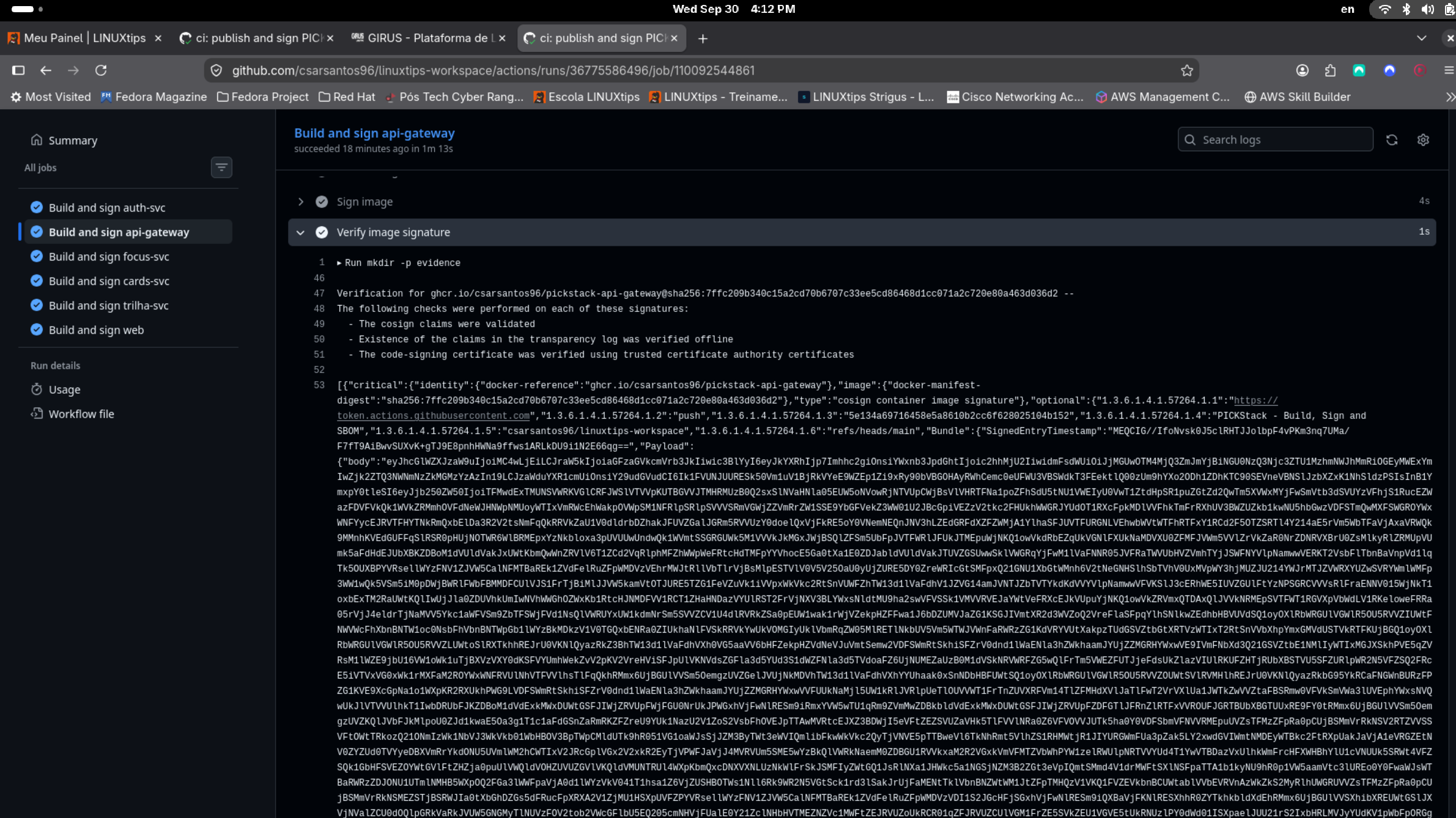
api-gateway verification within CI. Click on the image to open the original capture and read the logs.
Signing helps verify the image’s origin and integrity according to the expected identity. This does not guarantee the absence of vulnerabilities.
SBOM, or Software Bill of Materials, is the inventory of components identified in the image. The workflow enables sbom and provenance in BuildKit. The first option generates the inventory; the second records information about the build. These are the build attestations described by Docker.
Additionally, anchore/sbom-action generates an SBOM in SPDX JSON for download. Each evidence-* artifact bundles three files:
evidence-auth-svc/
├── image.txt
├── cosign-verification.json
└── sbom.spdx.json
image.txt records the image by its digest. The Cosign JSON stores the verification output, and sbom.spdx.json contains the inventory. The same organization is used for the other components.
The six jobs completed
Run 36775586496, from commit 5e134a6, finished with Success status, six jobs completed, and a displayed duration of 2 minutes and 3 seconds.
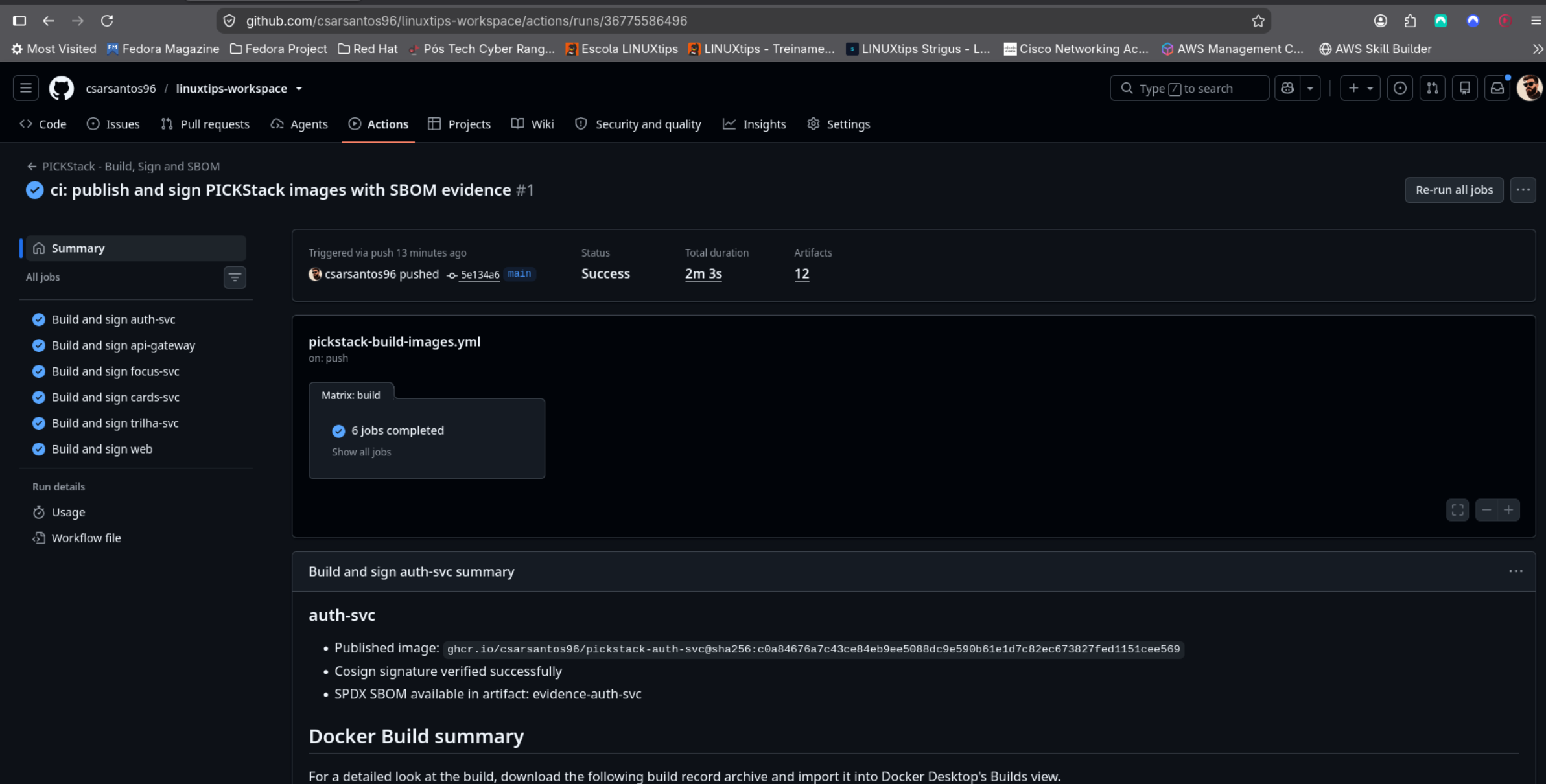
Result of the build, signing, and SBOM pipeline. The 12 artifacts displayed in the summary do not mean 12 SBOMs.
The six published images were:
ghcr.io/csarsantos96/pickstack-auth-svc
ghcr.io/csarsantos96/pickstack-api-gateway
ghcr.io/csarsantos96/pickstack-focus-svc
ghcr.io/csarsantos96/pickstack-cards-svc
ghcr.io/csarsantos96/pickstack-trilha-svc
ghcr.io/csarsantos96/pickstack-web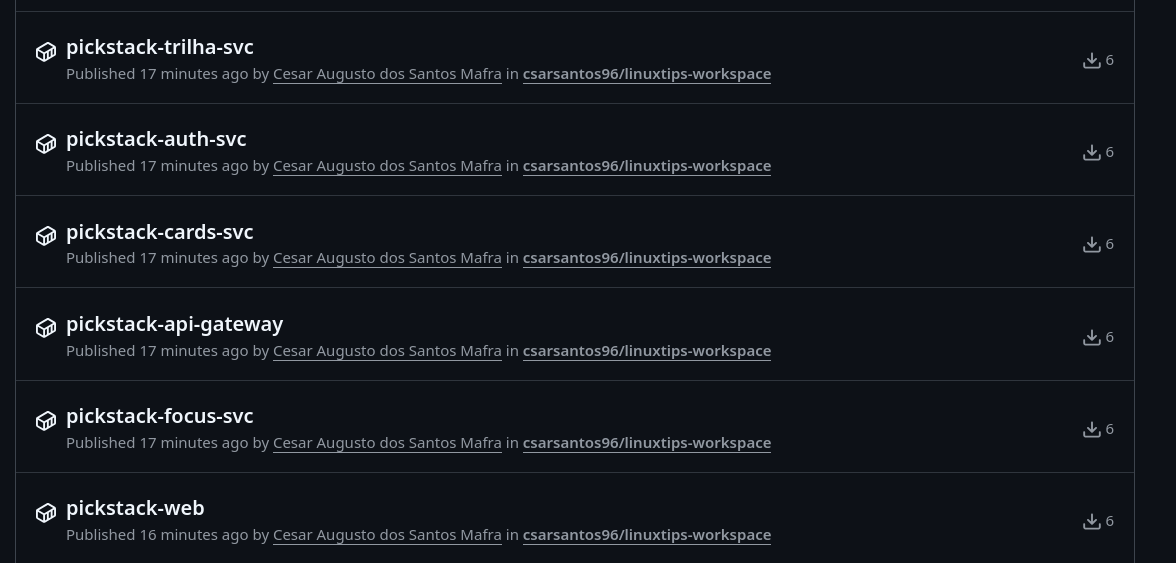
Packages published to GHCR: four business services, gateway, and frontend.
Repeating verification outside CI
The verification proven here occurred within the pipeline. To repeat locally, with Cosign installed and access to the image in the registry, you can download and extract one of the evidence-* artifacts and run this command in the folder containing image.txt:
IMAGE_REF=$(cat image.txt)
cosign verify \
  --certificate-identity 'https://github.com/csarsantos96/linuxtips-workspace/.github/workflows/pickstack-build-images.yml@refs/heads/main' \
  --certificate-oidc-issuer 'https://token.actions.githubusercontent.com' \
  "$IMAGE_REF"
The command uses the digest saved as evidence and the expected identity for that run on main. This is a reproducible exercise, not a local verification result that I am logging as completed.
Upon completing this step, I had validated the local workflows and automated the build, publishing, and signing of the six images. The scope was limited to this delivery; production deployment and Kubernetes were not part of it.
The registration with an error was the clearest example of what I needed to check: the health check response, the process environment, and the flow used by the interface were different verifications. In the pipeline, I also started having separate evidence for the published image, its signature, and its components.